
All topics
Help Center / Getting started
Finding your way around
After you sign in you land on Home, the Feed. Posts are in the middle, people and companies suggested to you are on the left, and your ecosystems and quick stats are on the right.
Where: The first page after you sign inGo to page
What's on the screen
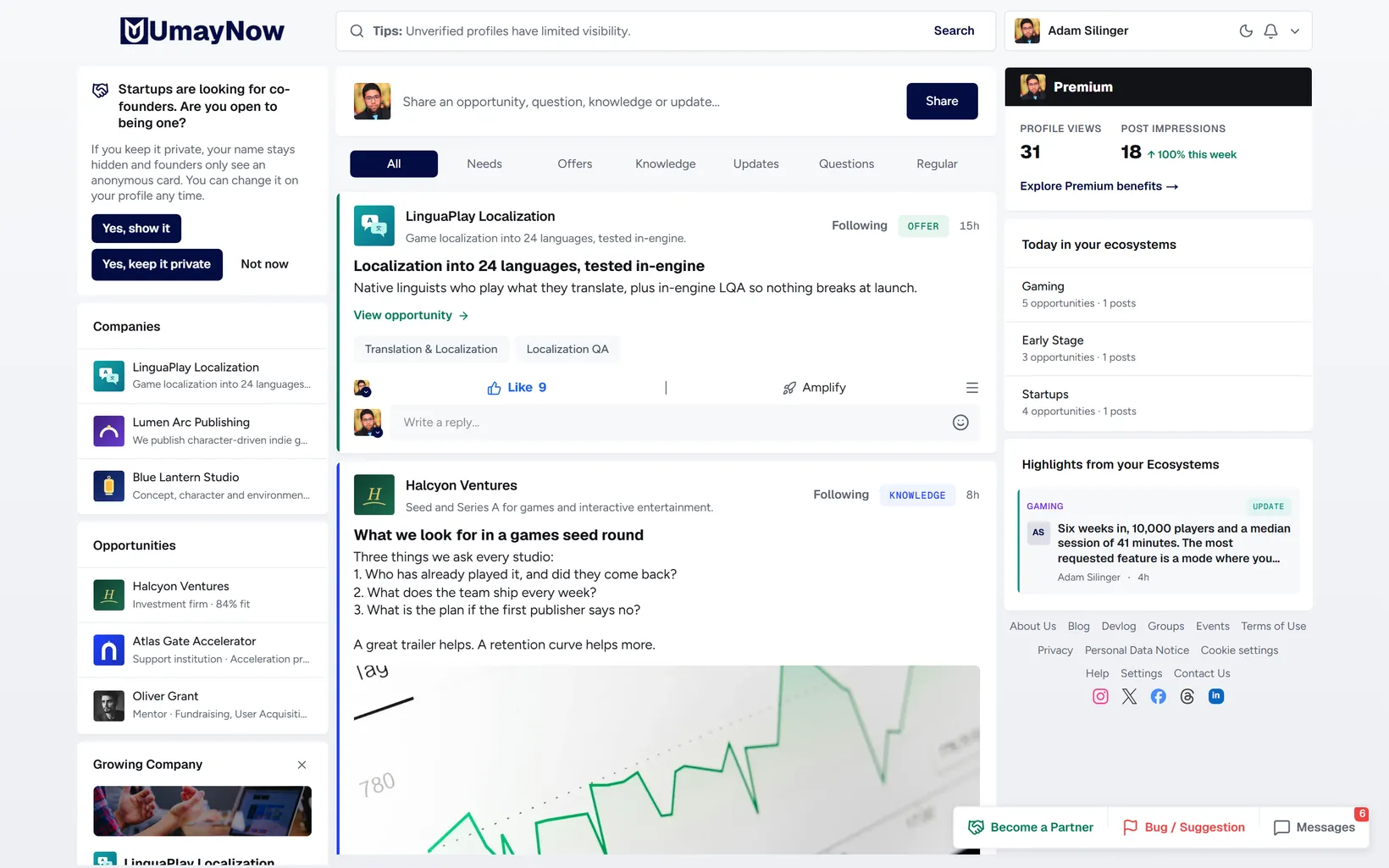
- 1Search: Search for people, companies, roles, industries or tags. The tips in the box change every time.
- 2Account box: Click your name to open the account menu. The moon icon next to it switches between light and dark theme.
- 3Updates: The bell. Connection requests, comments, meetings and other notifications arrive here.
- 4Post box: Share knowledge, a question, a need, an offer or an update.
- 5Filters: Limit the Feed to Needs, Offers, Knowledge, Updates, Questions or Regular posts.
- 6Left side: People, companies and opportunities picked for your goals.
- 7Right side: Your profile stats, your ecosystems and highlighted posts from them.
- 8Bottom bar: Become a Partner, Bug / Suggestion and Messages. It stays at the bottom right on every page.
Good to know
- Clicking the logo always takes you back to the Feed.
- Below the right-side cards you find links to About, Blog, Groups, Events, Help and Settings.