
All topics
Help Center / Messages
Messaging someone without connecting
You don't need to be connected to write to someone on UmayNow. But to someone you don't know, you can send at most 2 messages until they reply. This keeps inboxes free of spam.
Where: The Message button on a profile, or Messages > Write a message
What's on the screen
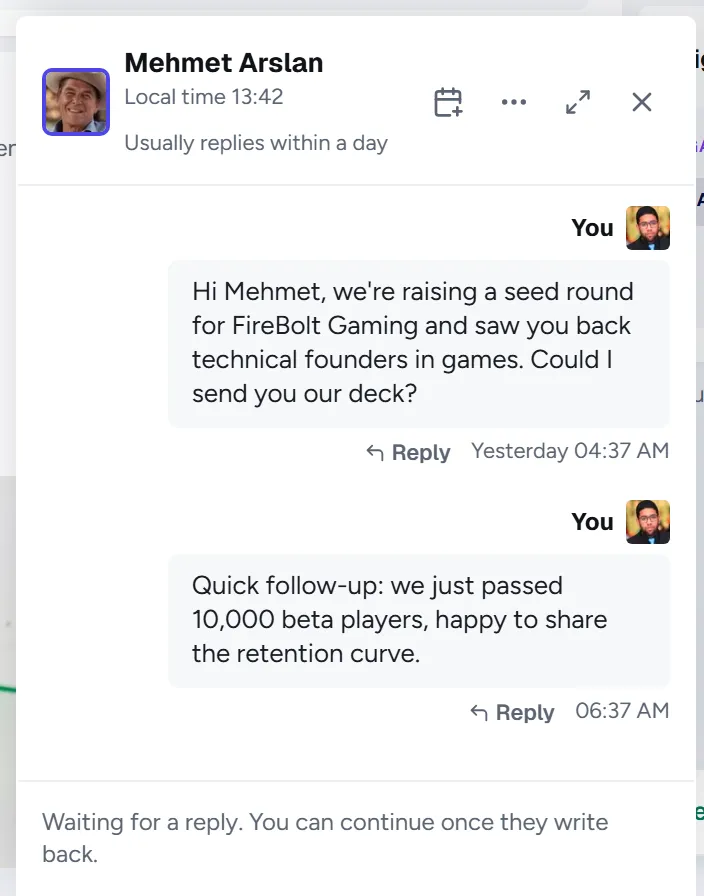
- 1Local time: Shown in the header when their clock differs from yours. Useful before writing at midnight.
- 2Your messages: At most 2 to someone you don't know.
- 3Waiting for a reply: After 2 messages the input locks. It unlocks when they write back.
How to
Writing a good first message
- Say who you are and why you are writing in the first sentence.
- If they left a Message Firewall note, read it and follow it.
- Ask for something concrete: a 20-minute call, a look at a file, an introduction.
Good to know
- The limit doesn't apply to your connections, people at the same company and people who already replied to you.
- Your first message lands in their Smart, Relevant or Other tab. The more complete your profile, the higher it sits.
- If you write from a listing, a post or a profile, the conversation shows where you came from.