
All topics
Help Center / Your profile
Profile sections
Your profile is more than a resume. It says what you do, what you offer and what you are looking for. When UmayNow suggests people, companies and opportunities to you, this is what it looks at most.
Where: Account menu > Profile
What's on the screen
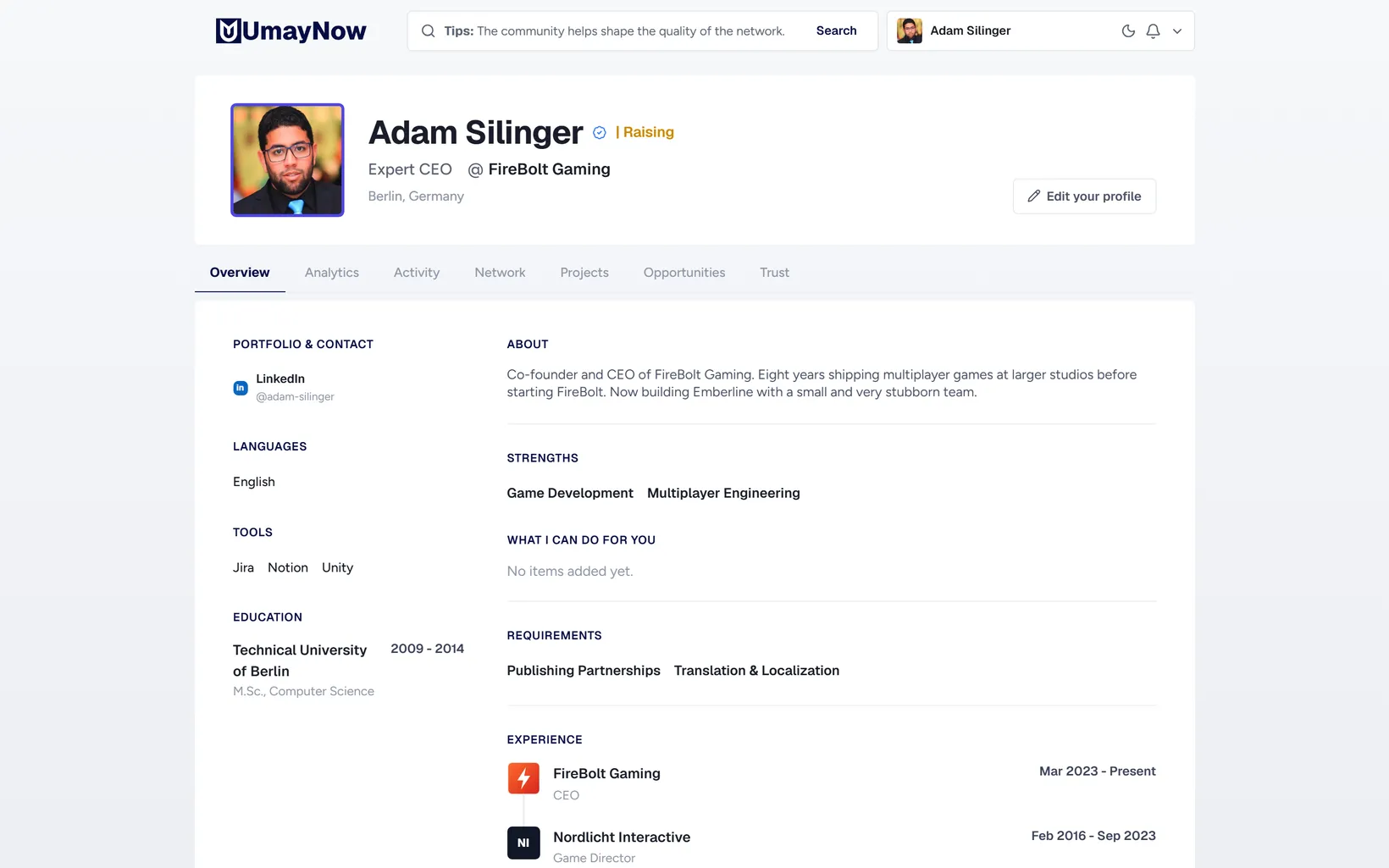
- 1Header: Photo, name, blue check, badges, role, seniority, company and city. Click any of them to edit in place.
- 2Edit your profile: Edit every field from one place. View as visitor is next to it.
- 3Tabs: Overview, Analytics, Activity, Network, Projects, Opportunities and Trust.
- 4About: A short, clear introduction. Say who you are and what you are working on.
- 5Strengths and Requirements: The skills you offer and the ones you need. These weigh the most in matching.
How to
Making your profile stronger
- Add your role, seniority and city.
- Add what you can offer to Strengths and what you need to Requirements.
- Fill in Experience, Education, Tools and Languages.
- Add your LinkedIn, website or portfolio links under Portfolio & Contact.
Good to know
- The Getting started list at the top of your profile shows the steps still missing.
- If your Strengths overlap with someone's Requirements, you are suggested to each other higher up.
- If the company in your experience is on UmayNow and confirms you as an employee, your experience shows as verified.