
All topics
Help Center / Messages
The chat window
When you open a conversation, useful details about the other person show in the header. You can reply to messages, add emoji and propose a meeting from here.
What's on the screen
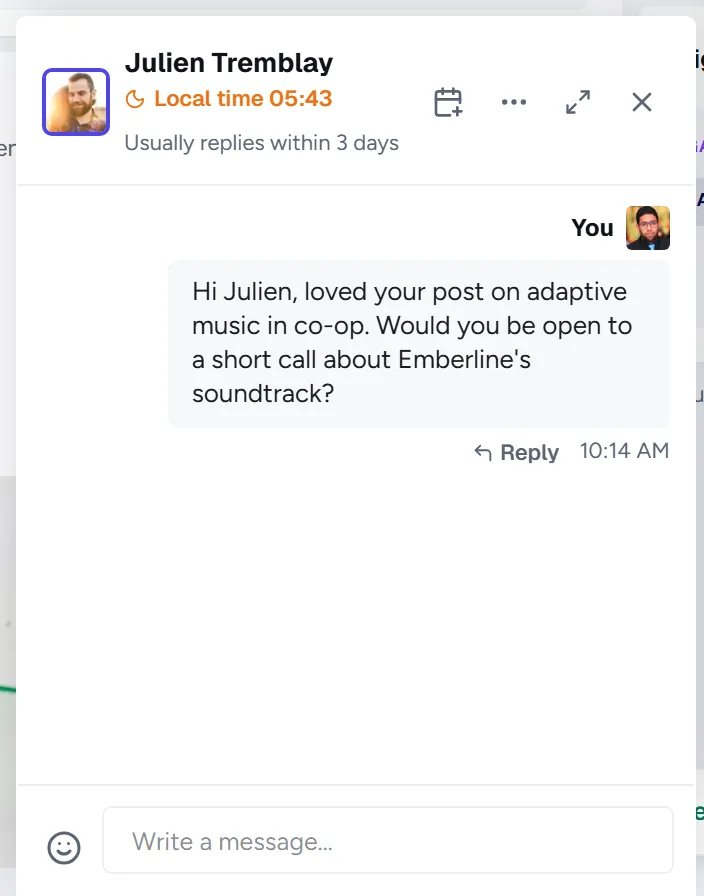
- 1Header: Their name, role and company. Click to open their profile.
- 2Reply time: For example Usually replies within a day, based on how quickly they replied in recent weeks.
- 3Calendar icon: Propose a meeting to this person.
- 4Input: Enter sends, Shift and Enter starts a new line.
Good to know
- Hover a message and choose reply to quote it in your answer.
- Use the Expand icon in the header to make the window bigger.