
All topics
Help Center / Companies
Opening a company page and its tabs
A company page is your company's storefront on UmayNow. It says what you do, what you offer and what you are looking for. Companies are matched and suggested just like people.
Where: Account menu > Add Business; for an existing company, its name in the account menu
What's on the screen
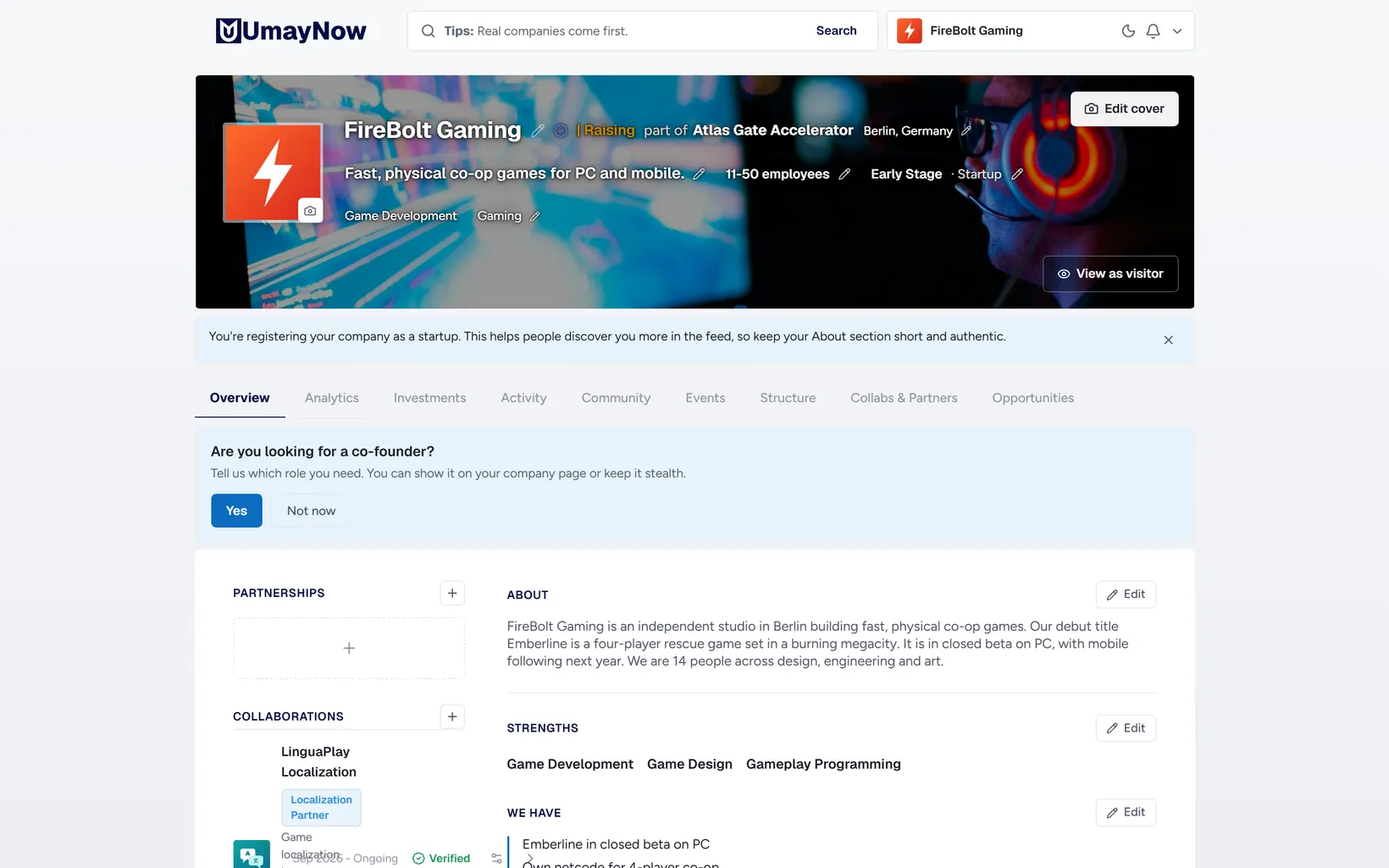
- 1Header: Logo, name, tagline, size, stage, industries, city and badges. Edit with the pencil icon.
- 2View as visitor: Shows how your page looks to others.
- 3Tabs: Overview, Analytics, Investments, Activity, Community, Events, Structure, Collabs & Partners and Opportunities. A red number means something new.
- 4Strengths and Requirements: What the company offers and looks for. Client and partner matching uses these.
How to
Opening a new company page
- Choose Add Business in the account menu.
- Enter the company name. The name is required.
- Pick industries, size, city and stage.
- Fill in About, Strengths and Requirements.
Good to know
- You can own several companies. All of them are listed in the account menu.
- The organization type (company, investor, support organization and so on) changes which tabs show.
- Verify with your domain or company email to get a check next to the company.
- Early-stage companies are featured in the Feed for free.